
Venmo Redesign
iOS Mobile App • Personal Project
Venmo is a mobile payment service that allows account holders to transfer funds over their mobile app. Touted as a digital wallet, Venmo incorporates mobile peer-to-peer payment to afford users easy access to their money and allow them to leave cumbersome cash, credit cards, and checks at home.
ROLE
UI / UX
Product Design
Graphic Design
User Research
TOOLS
Figma
Adobe Illustrator
TIMELINE
August 11.2020 -
CHALLENGE
My challenge is to redesign the experience and interface of Venmo in order to enhace how user's currently enjoy their use of the app.
GOALS
+ Understand how Venmo users feel when they use the app.
+ Determine which current features are seen as necessary and unnecessary.
+ Discover new features that could improve user engagement.
+ Maintain the current branding system but explore new UI elements.
Research
UNDERSTANDING THE USERS
Understanding how Venmo's current users feel about the product helps me as a designer define what creative solutions could be implemented and improved for the app. I wanted to understand how the app is primarily used, which features were most often used or overlooked, and the common issues users had faced. To fulfill these research goals, I looked over the customer reviews on the App Store, carried out 1-on-1 interviews, and conducted a survey that was completed by 28 participants.
The sample of users I polled gave me important qualitative data and accounts of personal experience, while the interviews helped me better understand the potential for Venmo to grow.
Strengths
The product's ease of use was a major feature that current users appreciated most. Users loved how simple it was to use the app and how quickly they were able to send/receive money from their friends. Users often described the experience as "seamless" and "convenient".
Weaknesses
Although users found the social media aspect of the app to be interesting and fun, the general consensus was that it felt "out of place" and that it wasn't an essential feature. Another point of dissatisfaction was that most users did not care for the transaction activities between people they did not know. Users would describe the global feed as "useless" and stated that it was not something they would ever check.
Opportunities
One of the primary reasons why Venmo was used was in order to split bills and checks during outings. However, there was no feature within the app to do so. Many users pointed out that they had to manually do this by some other means outside of the app. Additionally, since the app was primarily used in group situations, there was definitely a need to be able to create groups and help organize varying amounts of payments.
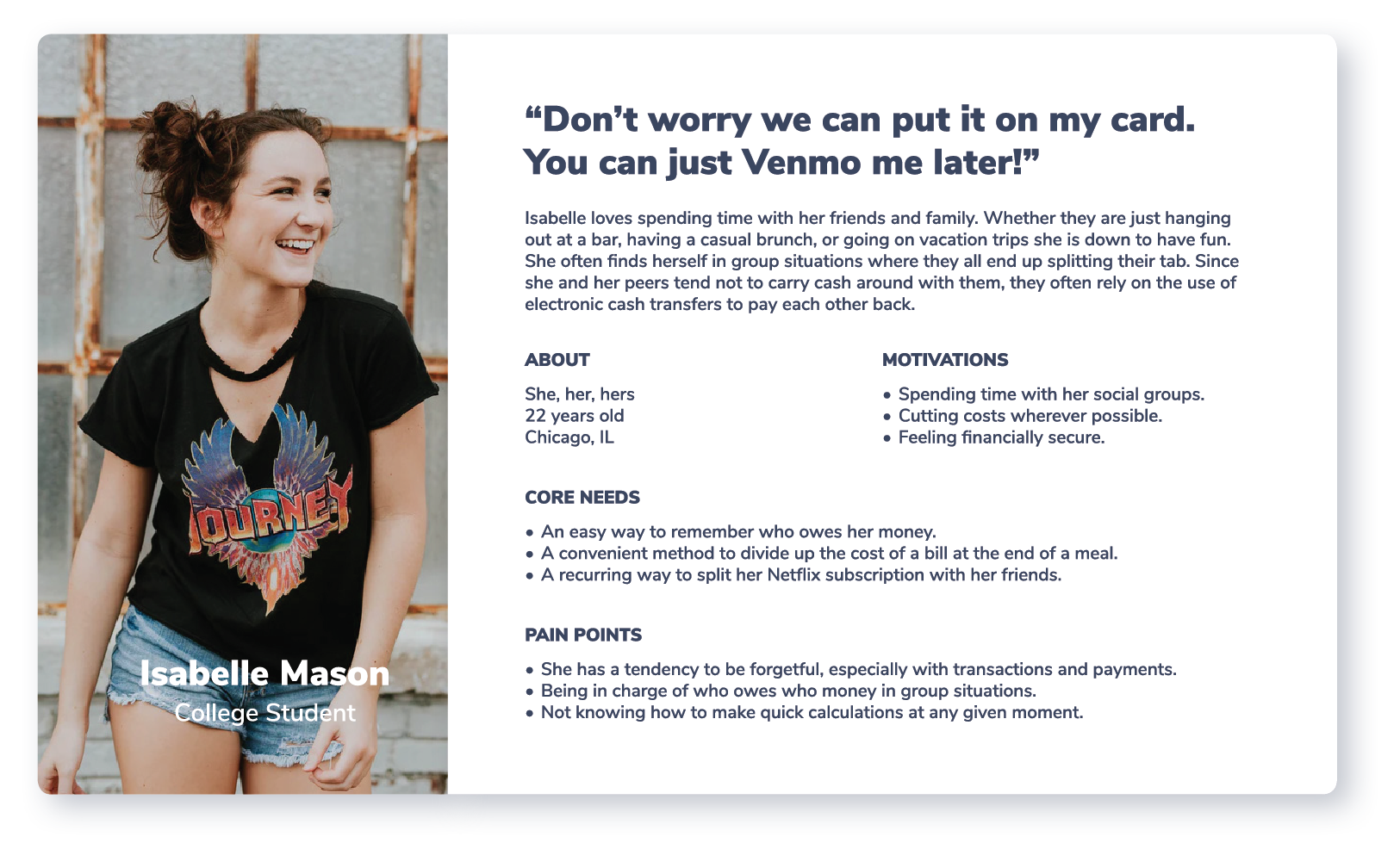
MEET ISABELLE MASON
My next step of my process involves building empathy, which helps me understand what added features might the users benefit most from. In order to do so, I created the following user persona based off of my research findings.
Define
BRAINSTORMING
Using insights from my research and Isabelle's empathy map, I created the following table in order to draw out potential new features for Venmo.

How might we help Isabelle keep a record of who still owes her money after an event?
How might we help Isabelle conveniently split the cost of her group's tab according to the amount each individual spent?
How might we help Isabelle simplify the process of collecting payment for her Netflix subscription each month?
DESIGN PRINCIPLES
My overall approach to this redesign was to improve the user experience of the app without changing the convenience that it offers. Here were my key principles:
- Replace the global feed with the ability to create and maintain groups in order to improve Venmo's social experience.
- Help users split expenses.
- Help users easily keep track of who they need to repay.
Ideation
USER FLOW
We decided to name our app Plugg to resemble the connection between business owners and influencers. The logo design is based off of a friendly character in the form of an electrical socket.
I selected a warm tone palette to represent the optimism and excitement that comes with a new relationship.
WIREFRAMES
We decided to name our app Plugg to resemble the connection between business owners and influencers. The logo design is based off of a friendly character in the form of an electrical socket.
I selected a warm tone palette to represent the optimism and excitement that comes with a new relationship.
MID-FIDELITY PROTOTYPE
We decided to name our app Plugg to resemble the connection between business owners and influencers. The logo design is based off of a friendly character in the form of an electrical socket.
I selected a warm tone palette to represent the optimism and excitement that comes with a new relationship.
FEEDBACK
We decided to name our app Plugg to resemble the connection between business owners and influencers. The logo design is based off of a friendly character in the form of an electrical socket.
I selected a warm tone palette to represent the optimism and excitement that comes with a new relationship.
What went well?
The product's ease of use was a major feature that current users appreciated most. Users loved how simple it was to use the app and how quickly they were able to send/receive money from their friends. Users often described the experience as "seamless" and "convenient".
What could be improved?
The product's ease of use was a major feature that current users appreciated most. Users loved how simple it was to use the app and how quickly they were able to send/receive money from their friends. Users often described the experience as "seamless" and "convenient".
The Final Product
PROTOTYPE
REFLECTION
Hey there, this is the default text for a new paragraph. Feel free to edit this paragraph by clicking on the yellow edit icon. After you are done just click on the yellow checkmark button on the top right. Have Fun!
NEXT STEPS
Hey there, this is the default text for a new paragraph. Feel free to edit this paragraph by clicking on the yellow edit icon. After you are done just click on the yellow checkmark button on the top right. Have Fun!